Philips LFH3510 SpeechMike Pro Premium Slide Switch

Overview: Philips LFH3510 SpeechMike Pro Premium Slide Switch
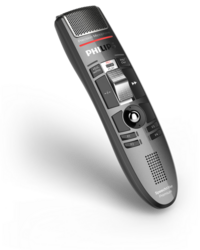
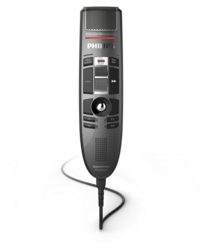
The Philips SpeechMike Pro Premium LFH3510 with Slider, for easy use by clinical professionals.
-
Free floating, decoupled microphone
for precise recording -
Built-in support for Nuance speech recognition
for a hassle-free ‘plug and play’ installation -
Hygienic surface
for improved efficiency in disinfecting the device -
Trackball
for integrated mouse function
Now with a new conversation mode, which supports ambient recording scenarios like capturing conversations at a desk.
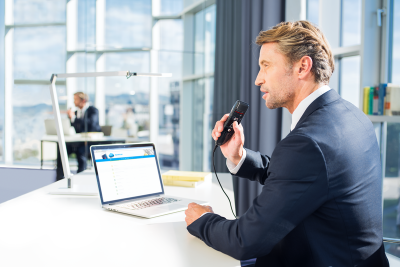
The integrated motion sensor automatically switches between dictation and conversation mode, when SpeechMike is picked up and placed on a desk.
Key benefits
· Supports both dictation and ambient recording use cases with one device
· Enables a smooth transition towards Ambient Voice Technology without changing the user's way of working
· Reduces training and change management effort due to familiar usage
· Increases flexibility by covering multiple recording scenarios without reconfiguration
· Protects existing hardware investment and lowers total cost of ownership
How to configure
Conversation mode is enabled by default and can be configured in the following ways:
· Device hotkey: on the device by pressing F2 + F4 simultaneously for 5 seconds
· Via Philips SpeechControl Software 4.9
· Using Philips Remote Device Management Software (PRDM)
When using the device hotkey, repeatedly pressing and holding F2 + F4 for 5 seconds cycles through the available position control settings. The Record LED on the SpeechMike Premium indicates the currently selected mode:
· Conversation mode enabled → LED lights up amber for 1 second
· Microphone mute mode enabled (conversation mode is disabled) → LED lights up red for 1 second
· Position control disabled (conversation mode is disabled) → LED lights up green for 1 second
Firmware update
To use this feature, the device must be updated to the required firmware version (3.87 for Philips SpeechMike Premium Automatic firmware upgrades can be performed via:
· Philips SpeechControl Software (Download here)
· Philips Remote Device Management Software (PRDM)
Philips LFH3510 SpeechMike Pro Premium Slide Switch
Product Description
The Philips SpeechMike Pro Premium LFH3510 with Slider, for easy use by clinical professionals.
With a free-floating studio quality microphone and new grille design with larger speaker hole area for crisp and clear playback recording quality, the Philips SpeechMike Premium series has set a new standard in digital desktop dictation.
Forget the clunky dictaphone with its bulk and size; instead try a sleek, streamlined, ergonomically superior SpeechMike Premium Series. Combine a SpeechMike Premium with efficient SpeechExec Pro dictation software and you’ve got a high-performing, professionally superior, low maintenance, well-balanced digital desktop dictation solution that will be the envy of your colleagues.
Key Features:
- New microphone suspension for improved recording quality and accuracy
- Large speaker hole area for crisp and clear recording playback
- Self-cleaning stainless steel trackball for a lifetime of smooth operation
- Durable buttons guaranteeing unchanged tactile feeling over the lifetime of the SpeechMike
- High quality drop resistance with double wall thickness for robust and extended use
- Detachable cable for extended lifetime
- Versatile usability across most computer environments with the low power USB port demand
- Intuitive design and functionality for blind operation and control of PC applications with the clickable dynamic laser trackball and enhanced front keypad mechanism
- Integrated motion sensor to avoid unintended recordings
- Configurable scroll wheel function
- Built-in playback volume control for convenience
- Four programmable function keys to get the most out of your SpeechMike
- Greater flexibility for speech recognition commands through the NEW “instruction” button (only for button devices LFH-3500 and 3600)
- Versatile and backwards compatibility for continued seamless integration into established work environments, including Citrix
What is the new conversation mode?
Conversation mode is part of the position control settings and adjusts the microphone depending on how the device is used:
· When the Philips SpeechMike Premium is placed on a desk, it switches to conversation mode
· When the device is picked up, it switches back to dictation mode
Key benefits
· Supports both dictation and ambient recording use cases with one device
· Enables a smooth transition towards Ambient Voice Technology without changing the user's way of working
· Reduces training and change management effort due to familiar usage
· Increases flexibility by covering multiple recording scenarios without reconfiguration
· Protects existing hardware investment and lowers total cost of ownership
How to configure
Conversation mode is enabled by default and can be configured in the following ways:
· Device hotkey: on the device by pressing F2 + F4 simultaneously for 5 seconds
· Via Philips SpeechControl Software 4.9
· Using Philips Remote Device Management Software (PRDM)
When using the device hotkey, repeatedly pressing and holding F2 + F4 for 5 seconds cycles through the available position control settings. The Record LED on the SpeechMike Premium indicates the currently selected mode:
· Conversation mode enabled → LED lights up amber for 1 second
· Microphone mute mode enabled (conversation mode is disabled) → LED lights up red for 1 second
· Position control disabled (conversation mode is disabled) → LED lights up green for 1 second
Firmware update
To use this feature, the device must be updated to the required firmware version (3.87 for Philips SpeechMike Premium Touch Automatic firmware upgrades can be performed via:
· Philips SpeechControl Software (Download here)
· Philips Remote Device Management Software (PRDM)
Compatibility
This feature is available for the following devices manufactured after June 2021:
· Philips SpeechMike Premium LFH3500 Series with serial number ≥ 594585x
· Philips SpeechMike Premium Touch SPM3700/3800 Series with serial number ≥ 149890x
· Philips SpeechMike Premium Air SMP4000 Series with serial number ≥ 5000
What's in the Box
- SpeechMike Premium Slide Switch Dictation Microphone
- USB cable (connected to device)
- Quick start guide
Specifications
Connectivity
USB: USB 2.0, type A (compatible with USB 3.0)
Audio recording
Microphone type: electret condenser microphone
Microphone capsule: 10 mm
Characteristic: uni-directional
Frequency response: 200 – 12 000 Hz
Sensitivity: -37 dBV
Signal-to-noise ratio :> 70 dBA
Sound
Speaker type: built-in round, dynamic speaker
Speaker diameter: 30 mm
Acoustic frequency response: 300 – 7500 Hz
Speaker output power: > 200 mW
System requirements for Philips SpeechControl software
Processor: Intel dual core or equivalent AMD processor, 1 GHz or faster processor
RAM: 2 GB (32 bit)/4 GB (64 bit)
Hard-disk space: 30 MB for SpeechControl software, 4.5 GB for Microsoft .NET Framework
Operating system: Windows 11, Windows 10 (64 bit), macOS 12/11 (Mac functionality may be limited)
Graphics: DirectX-compliant graphics card with hardware acceleration recommended
Sound: Windows-compatible sound device
Free USB port
Supported speech recognition software: Nuance Dragon Professional 12.5/13/14/15 Individual/Group, Nuance Dragon Legal 12.5/13/14/15, Dragon Medical Practice Edition 2/3, Nuance Dragon SDK Client Edition 14, M*Modal Fluency Direct 8.0 and above, Fusion Narrate powered by nVoq
Green specifications
Compliant to 2011/65/EU (RoHS)
Lead-free soldered product
Operation conditions
Temperature: 5° – 45° C / 41° – 113° F
Humidity: 10 % – 90 %
Dimensions
Product dimensions (W × D × H): 45 × 175 × 32 mm / 1.8 × 6.9 × 1.25 in
Weight: 200 g / 7 oz (including cable)
Cable length: 2.5 m / 8.2 ft
Design and finishing
Material: housing made of high-class polymers
Color: dark grey pearl metallic)
Optional Accessories
- Philips LFH4412 SpeechExec Pro Dictate V12 – two year licence
- Philips LFH4512 SpeechExec Pro Transcribe V12 – two year licence
- Philips SpeechLive 12-month licence – cloud solution
Philips LFH3510 SpeechMike Pro Premium Slide Switch